Rack up bonus cash back during checkout!*
Download the CashBack+ Pay* app for bonus cash back offers, easy redemptions, and seamless payments using your favorite Apple or Android device. Use it for your daily shopping, gifting, travel, and more.
Tap into bonus cash back offers by paying with gift cards while you're at checkout, whether that's in store or online. The payment is instant and so is the cash back! Each gift card purchased in the app will add instant cash back to your CashBack+ balance.

Here's how Visions members can use the app for convenient payments and bonus cash back:
Step 1: Get the pay app.
iOS (Apple):
1) Open the App Store
2) Search for “CashBack+ Pay”
3) Tap "Get" and then "Open"

Android:
1) Open Google Play
2) Search for “CashBack+ Pay"
3) Tap "Install" and then "Open"

Step 2: Link your Visions account.
When you open the app, find the Visions icon and link your account by logging in with your digital banking details. The CashBack+ Pay app encrypts your data and uses the same secure login protection as our digital banking. Not enrolled in digital banking? Learn more and enroll now.
When logging into CashBack+ Pay, you'll need your:
- User ID
- Password
- Secure Access Code – Please note, we will never ask you for this code, and neither will our partners with CashBack+. If anyone asks for your Secure Access Code, do not trust them. Call us for support at 800.242.2120.
Step 3: Browse the offers.
Search for your favorite brands and explore the bonus cash back offers. When you know what's in the app, you can plan to maximize your cash back and "hack" your shopping or gifting plans with exclusive brand-funded gift cards.
Offers may include:
- Up to 20% cash back
Brands personalize their offers and may update them frequently. - Flexible denominations
Some brands give you the flexibility to redeem gift cards for an exact dollar amount, down to the penny! - Local and national brands
Check out the offers for yourself – from brands that provide delivery services to major retailors to restaurants, grocers, and more!
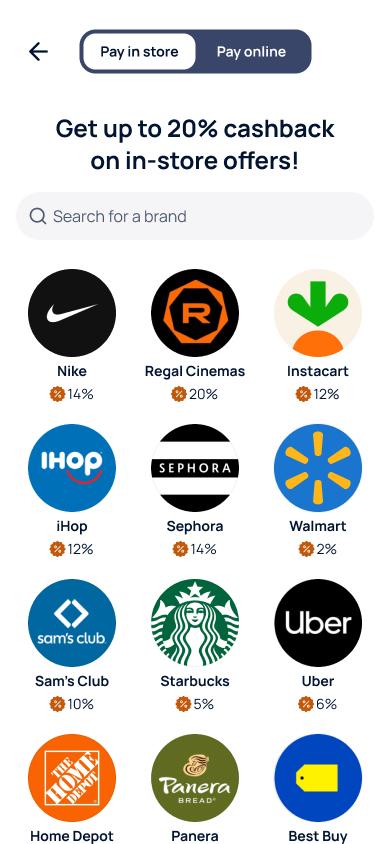
Step 4: Purchase, redeem, and earn cash back.
Redeem gift cards with cash back or purchase them with funds from your Visions savings/checking. You can even get the gift card instantly while you're checking out. Plus, you earn the same cash back whether you're shopping online or in-store – and the CashBack+ Pay app is convenient for both!
Tap "Shop Online" to shop within the app.
You'll be able to pick your brand, fill your cart, and use the checkout option "Pay with CashBack+ Offer." It's that simple!
Open the app and "Pay in store" when you're at the register.
Select the brand and enter your purchase amount to redeem a gift card for checkout. The app instantly provides your digital gift card with both a bar code and claim code for your convenience. Simply scan the bar code or enter your claim code to complete your purchase.
Just like mobile payments with your Visions Visa® credit card – it's easy to go cardless and still enjoy security, convenience, and the benefits of your Visions membership!
Download the CashBack+ Pay app to start earning, tracking, and redeeming cash back.